








SSL Secured Page
 Newlook Marketing promise to protect your personal information. Any page at newlook.com.sg that asks you for personal information is highly secured with SSL 128-bit encryption. This will prevent any third party servers from tapping the information.
Many potential customers still balk at releasing their credit card numbers to online entities.
Secure Sockets Layer (SSL) secures safe passage of credit card information, user names, passwords, and other sensitive e-commerce transactions.
How SSL works?
SSL utilizes the public-and-private key encryption system.
Because only the Web server has access to its private key, only the server can decrypt SSL-encrypted information. The Web server will) { be able to establish an encrypted link between the Web server and the shopper's Web browser.
How to know if a web page is secured?
A key or padlock icon in the browser's status bar indicates that the browser is running in secure mode.
There are two general indications of a secured web page:
- Check the web page URL
The URL (web page address) must begin with the letters "https://" instead of "https://" (note the additional "s" at the end).
Try it! - Visit our home page (https://www.newlook.com.sg); the URL begins with the "http" meaning this page is not secure.
Click on
button near the upper-right hand corner. Notice the change in the URL? It now begins with "https", meaning the user name and password typed in will be encrypted before sending to our server. - Check for the "Lock" icon
There is a de facto standard among web browsers to display a "lock" icon, normally near the bottom right corner of the browser window (NOT in the web page display area!).
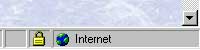 Microsoft Internet Explorer displays the lock icon in the lower-right of the browser window:
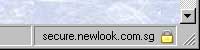 Mozilla's FireFox Web Browser displays the lock icon in the lower-right corner:
Click (or double-click) on the lock icon to see details of the site's security. This is important to know because some fraudulent web sites are built with a bar at the bottom of the web page to imitate the lock icon of your browser!
Try it! - Visit our home page (https://www.newlook.com.sg).
Click on
button to initiate a secure session. Note the lock icon display in YOUR browser. Click the icon, or double-click (varies by browser), and examine the security information displayed about the web site. If there is no display at the bottom of your browser try clicking "View" in the main menu and make sure "Status Bar" is checked.
If everything looks good, the company or individual(s) running that web site have provided you with a safe means of communicating your sensitive information. The web page is "secure".
Have a Secured Browse!


